

Reduce Desk Cable Clutter: 2026 Guide to a Zen Workspace
Is your workspace a high-energy command center or a tangled nest of "cable spaghetti" that's totally killing your focus? We've all felt that mental fog when a mess of wires takes over your view. It's hard to feel like a pro when you're constantly fishing a charging cord from behind the furniture or fighting off dust bunnies. If you're wondering how to reduce cable clutter on desk surfaces while keeping your aesthetic on point, you're in the right place! 🚀
You deserve a workspace that looks incredible on video calls and feels even better to work at. We promise to help you reclaim your space with simple hacks and the latest wireless upgrades. It's time to swap those tangled cords for sleek, multi-functional tools that actually spark joy. ✨
In this 2026 guide, we'll explore everything from smart 3-in-1 foldable wireless chargers to clever organization tricks. We're going to show you how to streamline your tech and create a zen hub that fuels your productivity. Let's dive in and clear the clutter! 🦖
Key Takeaways
- Learn why professional cable management is the secret to a high-energy, focus-driven workspace.
- Discover how to reduce cable clutter on desk setups by replacing messy cords with sleek 3-in-1 wireless charging hubs. ⚡
- Master the art of hiding wires using under-desk trays and sleeves for a totally "invisible" look.
- Find out how to use travel organizer bags and fun desk buddies to keep your portable gear tidy and full of personality. 🦕
- Implement a quick weekly audit to ensure your workspace stays dust-free and ready for your next big project!
Why Your Desk Setup Needs Professional Cable Management Solutions
Cable management is the ultimate art of organizing and securing your power and data wires for a cleaner, more professional look. It's about taking total control of your space! When you learn how to reduce cable clutter on desk surfaces, you aren't just cleaning up a mess. You're designing a high-energy productivity hub that actually sparks joy every time you sit down to work. Imagine starting your morning with a clear view instead of a "cable spaghetti" nightmare. It feels absolutely amazing!
Boosting your focus starts with removing visual noise from your peripheral vision. A tidy desk truly leads to a tidy mind. It's hard to reach a state of deep flow when you're constantly distracted by a dangling monitor cord or a tangled mouse wire. Professional solutions help you hide the chaos so you can stay in the zone and get more done. Plus, a clean setup makes your workspace feel much larger and more inviting.
Your tech is a big investment, and it deserves protection! Don't let a stray wire become a chew toy for your pets or a snag hazard for your office chair. Managing your cables keeps your expensive gear safe and secure. It's the smartest way to prevent accidental drops or hardware damage caused by someone tripping over a loose cord. When everything is tucked away, your gadgets stay exactly where they belong.
The Mental Cost of Cable Spaghetti
A messy workspace often leads to a messy mind. This is the "broken window" theory for your office. If you let one wire hang loose, soon the whole desk becomes a disaster! Taking the time to organize your setup improves your confidence during video calls. You'll feel like a total pro when your background and your desk look sharp and intentional. It's a simple way to level up your professional vibe and reduce daily stress.
Safety First: Avoiding Fire and Trip Hazards
Safety is a huge part of the cable management game. Tangled power strips can cause dangerous heat buildup, especially when you're running high-powered 2026 gadgets. Keeping wires off the floor is also a must to avoid tripping hazards in your home office. In a high-powered 2026 setup, professional cable management is the essential safety shield that protects your hardware and your home from electrical hazards. It's about peace of mind!
- Organize: Group similar cables together to simplify your setup.
- Secure: Use clips and ties to keep wires from moving around.
- Protect: Keep cords away from heat sources and foot traffic.
- Aesthetic: Choose management tools that match your desk's style.
The Foundation: Trays, Sleeves, and Magnetic Clips
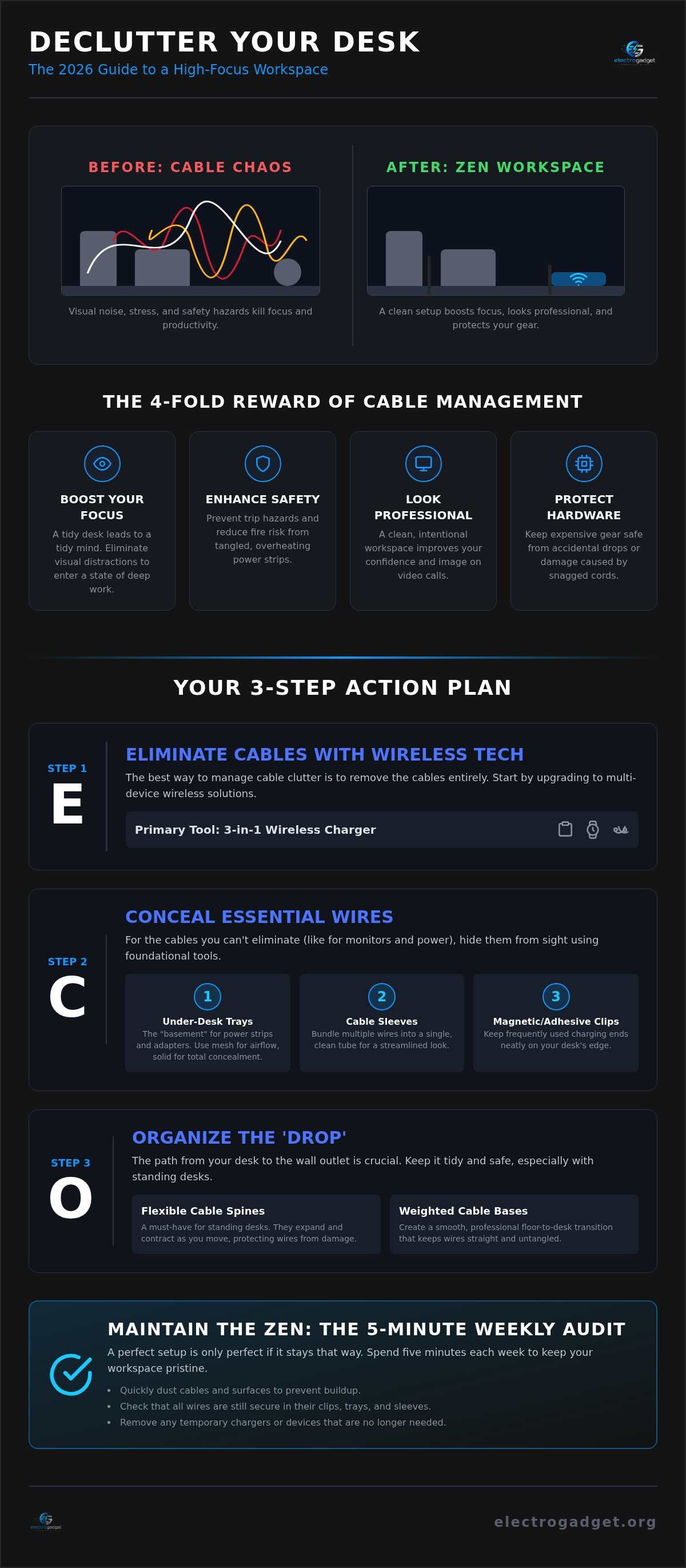
Ready to build your zen workspace? It all starts with the right foundation. If you've been wondering how to reduce cable clutter on desk setups, the answer is often hiding right under your nose. Or, more accurately, right under your desk! Under-desk cable trays are the true "basement" for your power strips and bulky adapters. They do all the heavy lifting while staying completely out of sight. It's the first step to reclaiming your floor space and your peace of mind! 🚀
Once the big power bricks are tucked away, it's time to bundle. Cable sleeves and looms are fantastic for turning a chaotic mess of five wires into one clean, manageable tube. It's a sleek look that instantly calms the visual noise. For those smaller cords that always seem to wander, magnetic cable clips are a total lifesaver. They keep your charging ends exactly where you need them on the desk edge. No more diving under the table to find a fallen cord! For quick fixes, adhesive cord organizers are simple, affordable, and incredibly effective. ⚡
Choosing the Right Under-Desk Tray
Picking the right tray depends on your specific gear. Mesh trays are a brilliant choice because they provide maximum airflow. This is vital for keeping high-powered 2026 adapters from getting too toasty. Solid metal trays offer a more "hidden" feel, completely masking every wire from every angle. You generally have two paths to take. Screw-in trays are rock-solid and perfect for permanent wooden desks. Clamp-on trays are the hero for renters or anyone with a glass desk. They provide a sturdy home for your gear without leaving a single mark! Always measure your largest power bricks before buying. You want plenty of room for everything to sit comfortably.
Managing the 'Drop' to the Floor
The "drop" is the space between your desk and the wall outlet. It's where most cable management plans fall apart! To keep things looking professional, use weighted cable bases for smooth floor-to-desk transitions. If you're rocking a height-adjustable standing desk, a flexible cable spine is a must-have. It expands and contracts as you move, keeping your wires safe and tidy. You can even use our cosmetic and toiletry bags as a clever, portable cable organizer for your smaller tech accessories when you're on the move! It's all about being smart with your space. To finish the look, try routing your main power cord down a desk leg with simple zip ties for a truly seamless, wireless vibe. 🦖
The Aesthetic Approach: Hiding Wires Without Losing Style
Organization doesn't have to look boring! When you're figuring out how to reduce cable clutter on desk surfaces, the goal is to make the management gear completely disappear. Start by color-coding your tools. If you have a white oak desk, use white sleeves and clips. For a dark walnut or matte black setup, stick to black accessories. This simple trick makes your management gear blend right into the furniture! It's all about that seamless, high-end look that makes you feel like a pro every time you sit down. 🎨
Want a truly "Invisible Desk"? Use the leg-routing technique! Grab some simple zip ties or adhesive clips and run your main power cables down the back of the desk legs. From the front, it looks like your electronics are powered by magic. You can even use small decorative items, like a potted plant, a framed photo, or a stack of books, to mask the exact spots where cables exit your desk. It's a clever way to keep the vibe lifestyle-friendly while hiding the "techy" bits. Moving from managed chaos to a minimalist dream is easy when you choose the right hero gadgets to anchor your space. ✨
Bedside Table Mastery
Your nightstand should be a place for relaxation, not a tangled nest of charging cords! Bedside clutter is a major mood-killer that can actually mess with your sleep hygiene. It's hard to unwind when you're staring at a "spaghetti" pile of phone and watch chargers right next to your pillow. Managing these cables is essential for a peaceful bedroom vibe. It helps your brain transition into rest mode without the visual stress of a mess. Check out The Ultimate Guide to a Clutter-Free Nightstand! to see how wireless tech can transform your sleep space into a zen sanctuary. 🌙
Adding Personality to Your Clean Desk
A clean desk shouldn't feel cold or empty. Every aesthetic setup needs a "hero" item to give it some soul and character! You can balance those sleek tech vibes with soft, lifestyle-friendly accessories that make the space feel like yours. We love using cute tech companions like the Dino Buddy toy to anchor the look. It adds a pop of personality while acting as a friendly guardian for your organized space. It's the perfect way to make your minimalist hub feel lived-in, welcoming, and totally unique. Mix your professional gear with fun elements to create a workspace you'll actually love using every single day! 🦖
Beyond Hiding: How Wireless Tech Eliminates Cable Clutter
Hiding your wires is a fantastic start, but why stop there? The absolute best way to manage a cord is to never have to plug it in at all. Going wireless is the ultimate secret for anyone wondering how to reduce cable clutter on desk surfaces. It's time to ditch the "spaghetti" for good! By moving from five separate chargers to one multi-device station, you instantly reclaim your desk's real estate. It's a high-energy upgrade that makes your workspace feel light, airy, and totally modern. You'll love the feeling of a wide-open desk that's ready for your biggest ideas. 🚀
Magnetic alignment is another total game changer for 2026 setups. MagSafe-style tech ensures your gear is always perfectly positioned for a fast charge. You won't have to worry about waking up to a dead phone because it slipped off the charging pad! This precision keeps your desk looking sharp and professional. Plus, it completely eliminates "cable fatigue." You'll never have to hunt through a drawer or crawl under furniture for the right cord again. Everything has its place, and every place is wireless. It's the most efficient way to keep your energy high and your focus sharp throughout the workday. ⚡
The Power of the 3-in-1 Solution
Consolidating your gear is the smartest move you can make for a clean aesthetic. Why have three separate cables for your iPhone, Apple Watch, and AirPods when you can use just one? A 3 in 1 foldable wireless charger is the ultimate desk hack for a minimalist vibe. It has a tiny footprint that leaves plenty of room for your coffee, your keyboard, and your favorite notebooks. This foldable tech is incredibly clever because it saves massive amounts of space on your desk and fits perfectly into your travel bags for life on the move. It's sleek, efficient, and looks amazing in any professional or home office setup!
Managing Tech on the Go
Don't let the clutter follow you out the door and into your commute! Carrying a tangled ball of wires in your backpack or purse is a recipe for daily stress. You can actually use minimalist travel toiletry bags as high-energy tech organizers to keep your portable gear in check. They are the perfect size for stashing your power banks, wired earbuds, and extra adapters. For the ultimate digital nomad lifestyle, the convenience of a mobile charger 3 in 1 ensures you stay powered up without the mess. Ready to transform your workspace? Check out our full collection of innovative tech accessories and start your zen journey today! 🦖
Maintaining Your Zen: A 5-Minute Weekly Cable Audit
You did it! You turned that "cable spaghetti" into a sleek, high-energy productivity hub. But the secret to a long-term zen workspace isn't just the initial setup. It's the maintenance! Clutter has a sneaky way of crawling back when we aren't looking. If you want to know how to reduce cable clutter on desk surfaces for good, you need a quick weekly audit. It only takes five minutes, but the payoff for your mental clarity is massive. Let's keep that vibe high! 🚀
Start by following the "One In, One Out" rule. Every time you bring a new gadget into your life, audit its cable needs immediately. Can it share a cord with something else? Can it charge on your wireless pad? Don't let a single unnecessary wire break your minimalist streak. While you're at it, take a moment to label your cables near the power source. There is nothing worse than accidentally unplugging your router or monitor in the middle of a high-stakes video call! Small tags save you from big headaches. ⚡
One of the best perks of a managed desk is how easy it is to clean. Tangled wires are total dust magnets, making it almost impossible to keep your space fresh. With everything tucked into trays or sleeves, your desk becomes 10x easier to wipe down. A quick swipe with a microfiber cloth keeps your 2026 setup looking brand new and professional. It feels amazing to work at a desk that actually stays clean! 🦖
The Weekly Reset Routine
- Step 1: Check for cable "creep." Ensure your wires haven't slipped out of their magnetic clips or shifted from their hidden routes.
- Step 2: Wipe down your surfaces and cable sleeves. Preventing dust buildup is the key to a healthy, high-energy environment.
- Step 3: Audit your charging needs. Look at any remaining wired devices and ask yourself if it's time to finally go wireless for that specific gadget.
The Future of the Organized Desk
The tech world is moving fast! Trends in 2026 are leaning toward total wireless integration and "invisible" power sources built right into our furniture. Staying ahead of the curve means constantly refreshing your management tools as your gadgets evolve. You can even stay inspired by checking out innovative personal care gadgets that simplify your daily routine and keep your life clutter-free. Modern wellness starts with a modern, organized space! 🌙
Your journey to a minimalist workspace is just beginning. By staying consistent with your weekly audits, you ensure that your desk remains a place of joy, focus, and incredible aesthetic. Start your organization journey with a clean slate today and feel the difference in your daily energy. You've got this! ✨
Step Into Your New Zen Reality
You've got the tools and the plan to finally master how to reduce cable clutter on desk surfaces for good! By building a solid foundation with trays and sleeves, then moving toward sleek wireless hubs, you're creating a space that actually works for you. You deserve a setup that feels light, airy, and ready for your next big breakthrough. Remember that a quick weekly reset is all it takes to keep your high-energy vibe going strong.
We've already helped organize over 10,000 desks worldwide with innovative 2026 tech designed specifically for minimalist living. It's time to join the community of focused pros who refuse to let "cable spaghetti" slow them down. We make it easy to start your journey with free global shipping on all your gadget essentials! Your perfect, professional workspace is just one click away.
Ditch the wires and upgrade to the 3-in-1 Foldable Wireless Charger today!
We can't wait to see your transformation. Go ahead and reclaim your space, boost your productivity, and enjoy that beautiful, clutter-free view every single morning. You've got this! 🚀
Frequently Asked Questions
What is the cheapest way to manage desk cables?
The cheapest way to manage your wires is by using simple household items like binder clips or twist ties. You can clip a binder clip to the edge of your desk and thread your charging cables through the metal loops. This keeps them from falling behind the furniture! It's an easy hack that costs next to nothing. While DIY is great, adding a fun anchor like a Dino Buddy can help keep those cords in place with style.
Do cable sleeves cause electronics to overheat?
Cable sleeves are generally safe and won't cause your electronics to overheat if used correctly. Most sleeves are made of breathable mesh or flexible plastic that allows heat to escape. To stay safe, don't pack high-powered power bricks inside a tight sleeve. Keep the bulky adapters in an under-desk tray where they have plenty of airflow. This ensures your 2026 tech stays cool while looking incredibly sleek and organized.
How do I hide cables on a desk in the middle of the room?
Hiding cables on a desk in the middle of the room is easy with floor cord covers or "cable snakes." These tools protect your wires and prevent tripping hazards by creating a flat path to the nearest wall outlet. You can also route your cables down one specific desk leg using clear adhesive clips. This makes the wires blend into the furniture's silhouette. It's a professional trick for a totally seamless look!
Are wireless chargers better for cable management than wired hubs?
Wireless chargers are definitely superior when you want to know how to reduce cable clutter on desk surfaces. A single 3-in-1 foldable wireless charger replaces three separate cords with one elegant device. Wired hubs are great for data transfer, but they still leave you with a "spaghetti" mess. Going wireless eliminates the physical noise and makes your workspace feel much larger. It's the ultimate upgrade for a high-energy, minimalist lifestyle!
Can I use command strips for cable management?
You can absolutely use command strips and adhesive clips for effective cable management! They are perfect for renters because they hold strong but peel off without damaging your furniture. Use them to route wires along the underside of your desk or down the back of a leg. It's a quick, damage-free way to keep everything tucked away. These strips are a must-have tool for creating a clean, professional-looking office setup.
How do I manage cables for a standing desk without them pulling?
Managing cables for a standing desk requires a flexible cable spine or a bit of extra slack. A cable spine expands and contracts as you move your desk, protecting your wires from being pulled or pinched. Always test the full height range of your desk before finalizing your wire routes. This ensures your tech stays connected whether you're sitting or standing. It's the best way to maintain your zen during a busy workday.
What is the best way to organize cables for travel?
The best way to organize your gear for travel is by using dedicated pouches like our cosmetic and toiletry bags. These bags are the perfect size for stashing your 3-in-1 foldable wireless charger and extra adapters. They prevent your cords from becoming a tangled ball at the bottom of your backpack. Keeping your tech organized on the go is a great way to how to reduce cable clutter on desk setups in hotels or cafes.